
Extracting Secrets from PCAPs
PCAP Analysis
Kerberos AS-REQ Pre-Auth Hashes

Note the existence of KRB5 protocol traffic on tcp/88, which is further identified as AS-REQ data. If we inspect the application layer data in the packets, we can see details such as username, domain info, etc. We should be able to carve this data out of the packet.
NTLMv2 Hashes

We can use a Wireshark display filter of ntlmssp and note that the protocol was used to authenticate to SMB in this instance. The packets of interest are those marked NTLMSSP_AUTH; where we can expand down into the application layer data and inspect the NTLM Response from the authenticating user or machine.
Using NetworkMiner on Kali
# Install mono as this is a Windows binary
sudo apt install -y mono-devel
# Download the latest free version
wget https://www.netresec.com/?download=NetworkMiner -O ./nm.zip
unzip nm.zip
mono NetworkMiner_2-8-1/NetworkMiner.exe --noupdatecheck
Once the program is launched, open the PCAP file
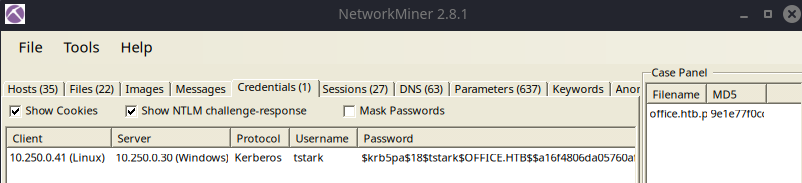
One example showing KRB5 AS-REQ pre-authentication hash

Another example showing NetNTLMv2 hashes
Right-click and choose copy password. Paste the contents into a file and crack with hashcat or john
john --wordlist=rockyou.txt --fork=4 hash.txtReferences
Extracting Kerberos Credentials from PCAP (netresec.com)