
XRDP Server on KDE Plasma
Install and Configure XRDP
# Install xRDP server
sudo apt update && sudo apt install -y xrdp dbus-x11
# Add self-signed certificate
sudo rm /etc/xrdp/cert.pem /etc/xrdp/key.pem
sudo openssl req -new -newkey rsa:4096 -x509 -sha256 -days 3650 -nodes -out /etc/xrdp/cert.pem -keyout /etc/xrdp/key.pem
sudo chown root:xrdp /etc/xrdp/key.pem
sudo chmod 440 /etc/xrdp/key.pem
# Enable the RDP daemon
sudo systemctl enable xrdp
Enable UDP in XRDP
sudo nano /etc/xrdp/xrdp.ini[globals]
; ...
; ...
; ...
use_udp=1Allow Multiple Logon Sessions
You may want to enable this if running a VM where you may have multiple desktop sessions for the same user.
sudo mv /etc/xrdp/startwm.sh /etc/xrdp/startwm.sh.orig
sudo nano /etc/xrdp/startwm.sh
Add this content to the startup script:
dbus-launch --exit-with-session startplasma-x11Restart the XRDP service
sudo chmod 755 /etc/xrdp/startwm.sh
sudo systemctl restart xrdp display-manager
Define Login Parameters
If we look at /etc/xrdp/sesman.ini, we can see that two groups are required to authenticate to the RDP server:
TerminalServerUsers=tsusers
TerminalServerAdmins=tsadmins
You can choose one of the following things to allow login to this server:
- Create the required groups and add your user(s)
- Change the admin / user group names to existing groups on your system
- Or, disable checks for these groups
1) Add the Groups
Using the example commands below, we add two groups, tsusers and tsadmins and add the user, user.name to the groups
groupadd tsusers
groupadd tsadmins
usermod -aG tsusers,tsadmins user.name
2) Or... Disable Group Checks
Edit the session manager configuration file.
nano /etc/xrdp/sesman.iniAnd, comment out the lines that define the login groups. This will allow anyone to login to the RDP server as long as they have valid credentials.
; TerminalServerUsers=tsusers
; TerminalServerAdmins=tsadmins
Allow Login as Non-Root User
echo 'allowed_users=anybody' | sudo tee -a /etc/X11/Xwrapper.config
echo 'needs_root_rights=no' | sudo tee -a /etc/X11/Xwrapper.config
sudo systemctl restart xrdp display-manager
Enable Audio Playback
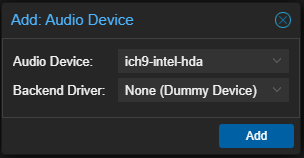
sudo apt install -y pipewire-pulse pipewire-module-xrdpProxmox is my hypervisor and I needed to add an audio device to my VM. The driver pictured below worked for me:
Troubleshooting
Good reference here: https://wiki.archlinux.org/title/xrdp
References
https://linux.die.net/man/5/sesman.ini
https://wiki.archlinux.org/title/xrdp
https://www.kali.org/docs/troubleshooting/no-sound/